|
invent!ory ULTRA Help |
||
|
Search & Replace
Editing: Transactions |
||
|
Example:
Replace |
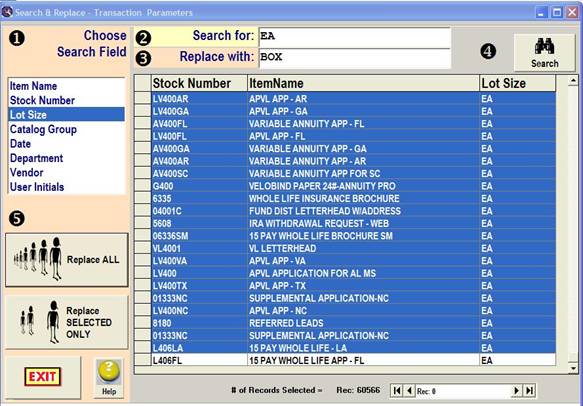
Tip: Follow the circled black numbers: |
|
|
|
1.
In the "Choose
Search Field" box, click " 2.
In the “Search for”
box, enter "Each." 3.
In the “Replace with”
box, enter “Box” 4.
Click “Search” button. The result:
60566 matching items are found and displayed in the grid (left). |
|
|
5.
Click
the “Replace ALL” button.
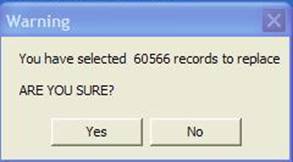
A warning message box
alerts you "You have selected 5861items to replace." Click “Yes” in response to the “ARE YOU
SURE?” query. |
||
|
|
·
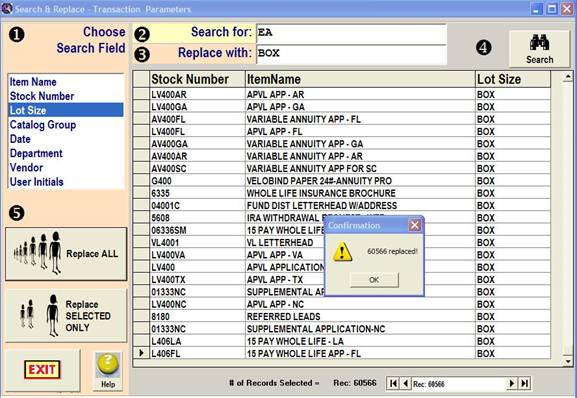
the grid now shows
"BOX" in the Lot Size
column ·
a confirmation
message box appears If you only wish to
replace selected transactions, use the
button. See this link (below) for more on the selective replace technique. http://noosphere.bizland.com/Help/Help_SearchReplace.htm |
|
|
Copyright
2009, Koehler Software, Inc. |
||